Flight Control
Movement and positioning
Keep the ship moving where the crew needs it, with room to brake, turn, and recover.
What you do
Section titled “What you do”Flight Control decides the ship’s position and heading. Forward and reverse thrust change speed, turning changes the bow, and braking reduces drift. Your tactical display keeps the ship centered so nearby hazards and shared markers stay readable while you move.
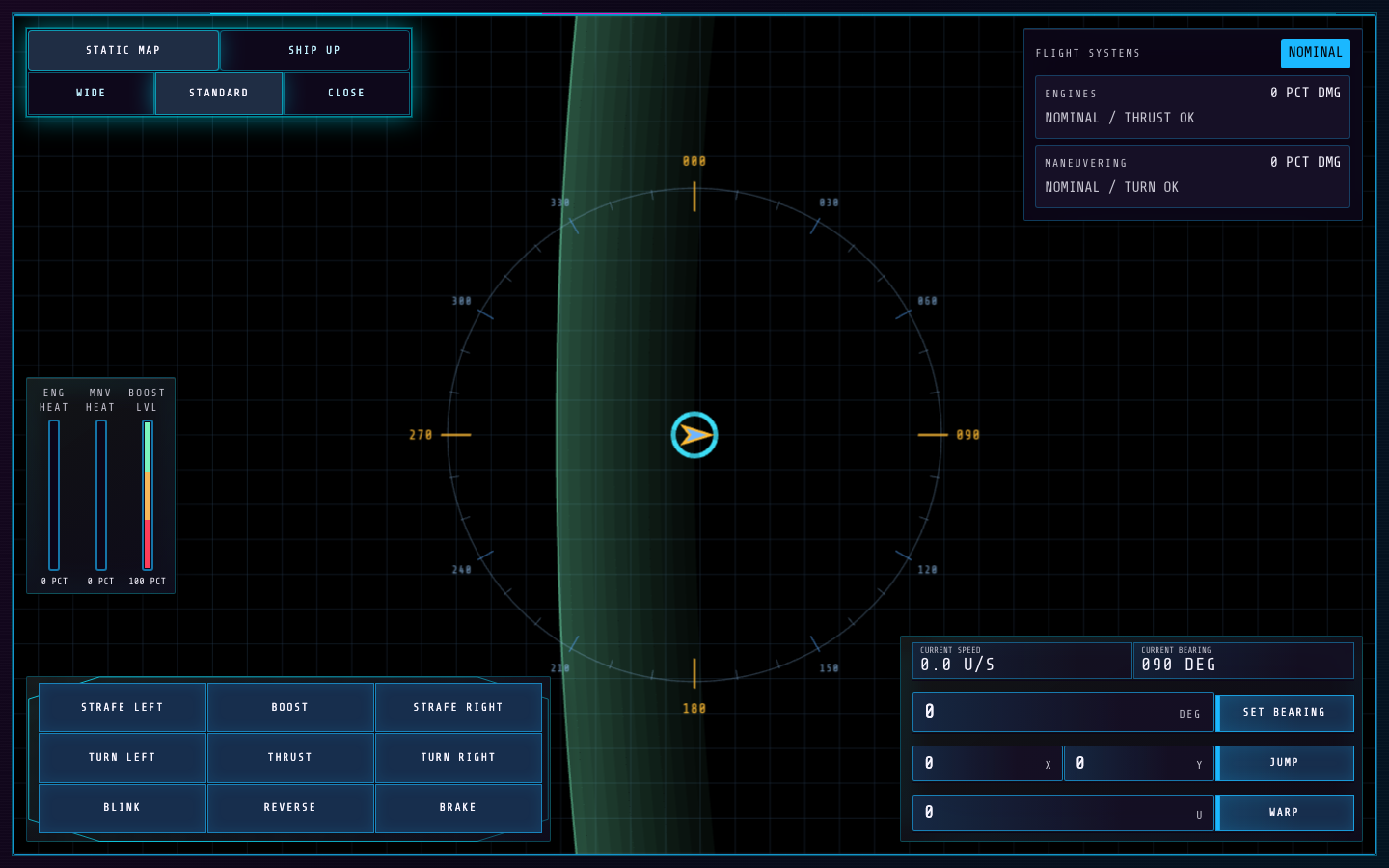
- The tactical display shows the ship, nearby objects, and projected hazards.
- Maneuver and drive controls sit beside the live speed and bearing readouts.
How to control it
Section titled “How to control it”- Hold thrust, reverse, and turn keys to change the ship’s motion. Brake when you need to shed speed rather than turn through an obstacle.
- Use the maneuver controls to enter a target bearing and set a one-shot vector. You can also use the on-screen drive buttons when an upgrade makes a drive available.
- Switch between world-up and ship-up map orientation, then choose wide, standard, or close zoom for the current task. Holding Control reveals hotkey hints on the Flight buttons.
| Action | Default key |
|---|---|
| Thrust | W / Up arrow |
| Reverse | S / Down arrow |
| Turn left | A / Left arrow |
| Turn right | D / Right arrow |
| Strafe left | Q |
| Strafe right | E |
| Boost | Shift / Shift |
| Blink | B |
| Brake | Space |
| Map world up | M |
| Map ship up | U |
| Zoom wide | 1 |
| Zoom standard | 2 |
| Zoom close | 3 |
| Set bearing | Enter |
Key systems
Section titled “Key systems”Momentum continues after you release thrust. Boost gives a stronger burst when available, but movement and turning add heat. Asteroids and gravity wells can alter the safe path; watch projected impact warnings and leave space to brake. Blink, strafe, jump, and warp controls appear only when the corresponding ship upgrades are enabled.
Upgrades
Section titled “Upgrades”Blink Drive
2,000 creditsAdds a short forward blink that quickly changes the ship's position, then enters cooldown.
Use it: Use it to escape an immediate hazard; check the space ahead before triggering it.
Strafe Thrusters
650 creditsUnlocks sideways thrust without requiring the ship to turn first.
Use it: Strafe to correct a firing angle or dodge while keeping the bow pointed at a target.
Jump Drive
4,400 creditsAdds coordinate entry and a charged jump that moves the ship to the chosen position.
Use it: Set both coordinates and allow the charge to finish before relying on the jump.
Warp Drive
4,800 creditsAdds a charged, high-speed travel action with an entered distance and an early-stop control.
Use it: Warp drops shields during travel, so choose a clear route and stop if conditions change.
Useful habits
Section titled “Useful habits”- Turn before accelerating hard when you need a sharp change of route. Braking early is easier than correcting at the last moment.
- Use the wide map to read a route, then close zoom for nearby hazards and precise positioning.
- Tell Weapons when you are changing heading or speed so their target can stay inside its firing arc.
Station challenge: Obstacle Course
Section titled “Station challenge: Obstacle Course”The ship starts at the bottom of a fixed asteroid corridor. Reach the finish zone at the far end as quickly as you can. Timing begins with your first piloting action. Collisions do not end the run, but each counted collision adds 3 seconds to your final time. The result shows raw time, collision count, penalty, and total time. All ship upgrades are disabled, so the course tests baseline thrust, reverse, turn, brake, boost, and bearing control.
Practice goal: make smooth corrections, brake before tight gaps, and finish with fewer collisions rather than only holding thrust.