Engineering
Power and system stability
Balance reactor power, coolant, and heat while other stations change their demands.
What you do
Section titled “What you do”Engineering keeps the ship’s systems useful without letting heat run away. Allocate reactor power across the system lanes, distribute a limited coolant budget, and respond when one system is asked to do more work.
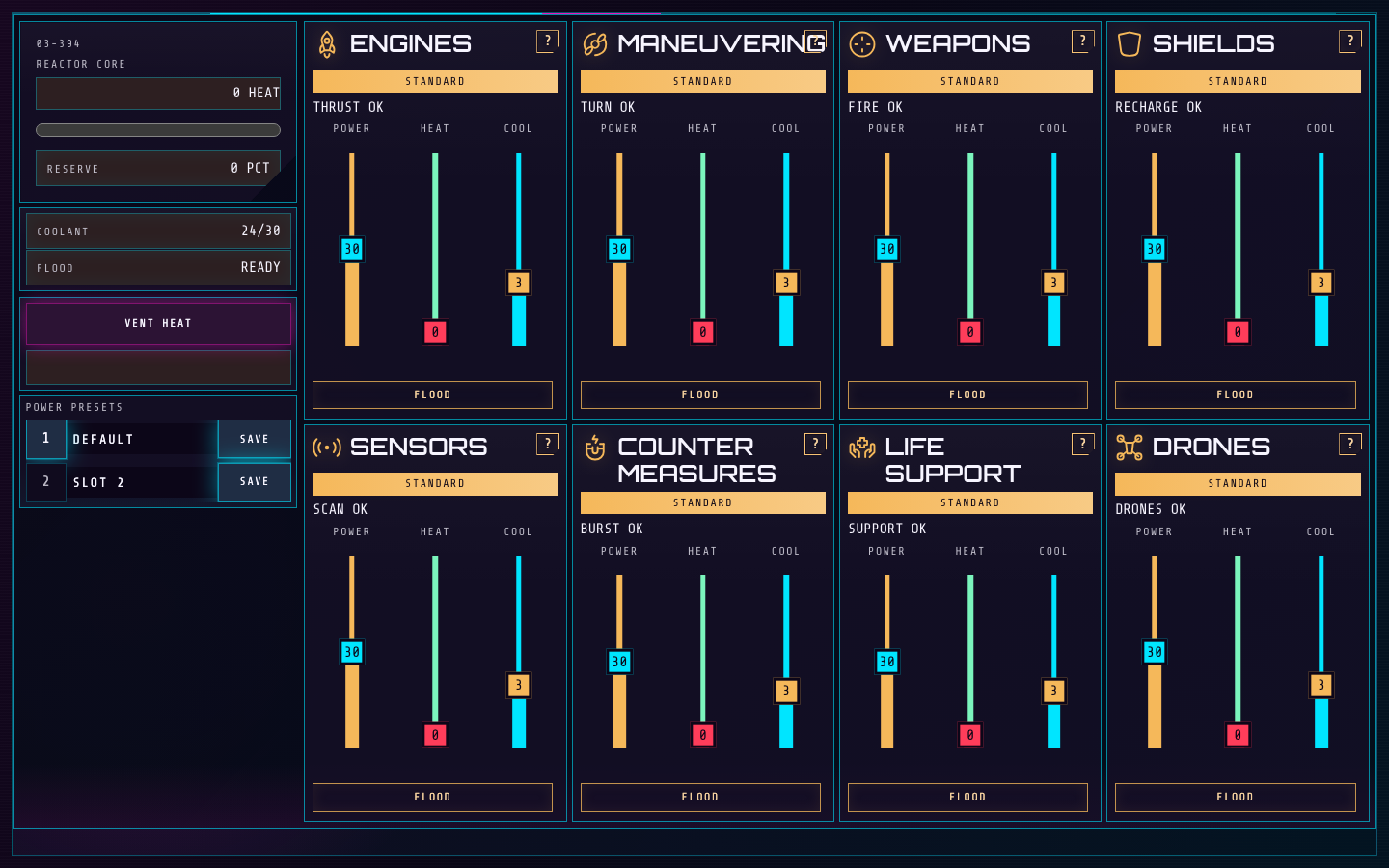
- The reactor summary shows available power, deployed coolant, and overall heat.
- Each system lane has power, coolant, heat, and operational readouts.
How to control it
Section titled “How to control it”- Drag a system’s power slider to change its output and its coolant slider to cool that system. The coolant budget is shared, so adding coolant to one lane leaves less for others.
- Use each system’s power and coolant hotkey to raise its allocation; hold Shift with that key to lower it. The selected system stays visible in its lane readout.
- Press Q or use the Vent control when Heat Vent is installed. Save and recall numbered presets when Power Presets is installed. Holding Control shows the station’s hotkey reference.
| Action | Default key |
|---|---|
| Vent heat | Q |
| Load preset 0 | 0 |
| Load preset 1 | 1 |
| Load preset 2 | 2 |
| Load preset 3 | 3 |
| Load preset 4 | 4 |
| Load preset 5 | 5 |
| Load preset 6 | 6 |
| Load preset 7 | 7 |
| Load preset 8 | 8 |
| Load preset 9 | 9 |
| Engines power trim | A |
| Maneuvering power trim | S |
| Weapons power trim | D |
| Shields power trim | F |
| Sensors power trim | G |
| Countermeasures power trim | H |
| Life support power trim | J |
| Drones power trim | K |
| Engines coolant trim | Z |
| Maneuvering coolant trim | X |
| Weapons coolant trim | C |
| Shields coolant trim | V |
| Sensors coolant trim | B |
| Countermeasures coolant trim | N |
| Life support coolant trim | M |
| Drones coolant trim | , |
Key systems
Section titled “Key systems”System power affects what other stations can do. Overdrawing or overpowering a lane can build critical heat and cause a temporary shutdown; sustained critical heat can damage the system. Coolant helps the hottest lanes recover, while emergency Coolant Flood is a separate upgrade action for one stressed system.
Upgrades
Section titled “Upgrades”Heat Vent
800 creditsUnlocks a reactor heat vent action for recovering from heat spikes.
Use it: Vent before heat stays critical; continue watching the hottest individual systems.
Coolant Flood
1,900 creditsUnlocks an emergency coolant burst for one selected system.
Use it: Save it for a system that needs immediate cooling beyond normal coolant allocation.
Power Presets
500 creditsAllows named power and coolant arrangements to be saved and recalled.
Use it: Keep a balanced preset and one or two specialist setups for rapid handoffs.
Useful habits
Section titled “Useful habits”- Keep a balanced baseline. Shift power toward a request, then restore it when that burst of work is over.
- Read the hottest system as well as total reactor heat; a cool reactor summary can hide one stressed lane.
- Use presets for common allocations, but check live heat before loading one under pressure.
Station challenge: Power Relay Drill
Section titled “Station challenge: Power Relay Drill”A fixed 3-minute stream of requests arrives as station-message toasts. Each request names or hints at one system and one output band: low, standard, full, or overpowered. Bring that system into the requested band within 14 seconds to earn 1 point. Requests sometimes arrive close together. The final screen shows your score, missed requests, and elapsed time.
Practice goal: read the system and band first, make the smallest useful power change, then prepare for the next request without overheating the board.